
Sprint 6 Final Project
CS111 evidence portfolio covering OOP, control structures, data types, and operators drawn directly from the Escape Game source code.
Final Portfolio
This page maps every required CS 111 learning objective to exact lines from the Escape Game source files. All code excerpts are taken directly from the project.
CS111 Portfolio Checklist
Object-Oriented Programming
| Done | Objective | Evidence |
|---|---|---|
| ☑ | Writing Classes | GameLevelForestDeath, NpcAiChat, and 5 other level classes |
| ☑ | Methods & Parameters | cleanAndTransition(targetLevelClass, primaryGame), _bubble(text, who), launchSublevel(levelClass) |
| ☑ | Instantiation & Objects | this.classes arrays in every level; 12 objects in GameLevelMazeSub |
| ☑ | Inheritance (Basic) | GameObject → Character → Player / Npc, plus Barrier, Coin, GameEnvBackground |
| ☑ | Method Overriding | interact and reaction overridden on every NPC sprite config |
| ☑ | Constructor Chaining | new NpcAiChat(...) x3 in GameLevelForestWin; new GameControl(..., { parentControl }) |
Control Structures
| Done | Objective | Evidence |
|---|---|---|
| ☑ | Iteration | Fisher-Yates for loop, forEach on container children, .map() for door sprites, for loop for typing dots |
| ☑ | Conditionals | NPC interaction guard (if dialogueSystem && isDialogueOpen), Exit Warden transition, NpcAiChat.close() guard |
| ☑ | Nested Conditions | 3-level nesting in GameLevelDoors.js; empty-input → try/catch → reply/error in NpcAiChat.send() |
Data Types
| Done | Objective | Evidence |
|---|---|---|
| ☑ | Numbers | SCALE_FACTOR, STEP_FACTOR, ANIMATION_RATE, pixel dimensions, Math.round(rx * width) |
| ☑ | Strings | id: 'The Wraith', sprite src paths, template literals for CSS and error messages |
| ☑ | Booleans | GRAVITY: false/true, isCorrect, isOpen() returning !!this.container && ... |
| ☑ | Arrays | dialogues[], doorConfigs[], xPositions[], this.history[], this.classes[] |
| ☑ | Objects (JSON) | Full sprite config objects (sprite_data_r2d2), API request body via JSON.stringify(...) |
Operators
| Done | Objective | Evidence |
|---|---|---|
| ☑ | Mathematical | Math.round(rx * width), Math.floor(Math.random() * n), % taunts.length, _tauntIndex++ |
| ☑ | String Operations | Template literals for CSS (justify-content:${...}), error strings (API ${res.status}), key lookup with \|\| fallback |
| ☑ | Boolean Expressions | && interaction guard, \|\| fallback for parentControl, ! negation, ?. and ?? in API reply |
Input / Output
| Done | Objective | Evidence |
|---|---|---|
| ☑ | Keyboard Input | Player controlled via engine key event listeners (arrow keys / WASD) |
| ☑ | Canvas Rendering | draw() via GameEngine; sprites, backgrounds, platforms rendered each level |
| ☑ | GameEnv Configuration | gameEnv passed into every level constructor; GameControl and level arrays configured in each file |
| ☑ | API Integration | fetch POST to AI NPC API in NpcAiChat._ask() with model and messages |
| ☑ | Asynchronous I/O | async _ask() method; await fetch(...) in NpcAiChat |
| ☑ | JSON Parsing | JSON.stringify(...) for API body; data.content.find(b => b.type === 'text')?.text ?? '...' |
Documentation
| Done | Objective | Evidence |
|---|---|---|
| ☑ | Code Comments | Inline comments throughout all level files explaining logic |
| ☑ | Mini-Lesson Documentation | Portfolio page with embedded live game runners |
| ☑ | Code Highlights | Annotated code snippets with explanations for every objective |
Debugging
| Done | Objective | Evidence |
|---|---|---|
| ☑ | Console Debugging | console.log("Initializing GameLevelForestDeath..."), console.error('NPC AI error:', e), console.log in all code runners |
| ☑ | Hit Box Visualization | Tuned widthPercentage and heightPercentage on all sprite hitboxes in GameLevelMazeSub.js by toggling the GameEngine’s hitbox overlay |
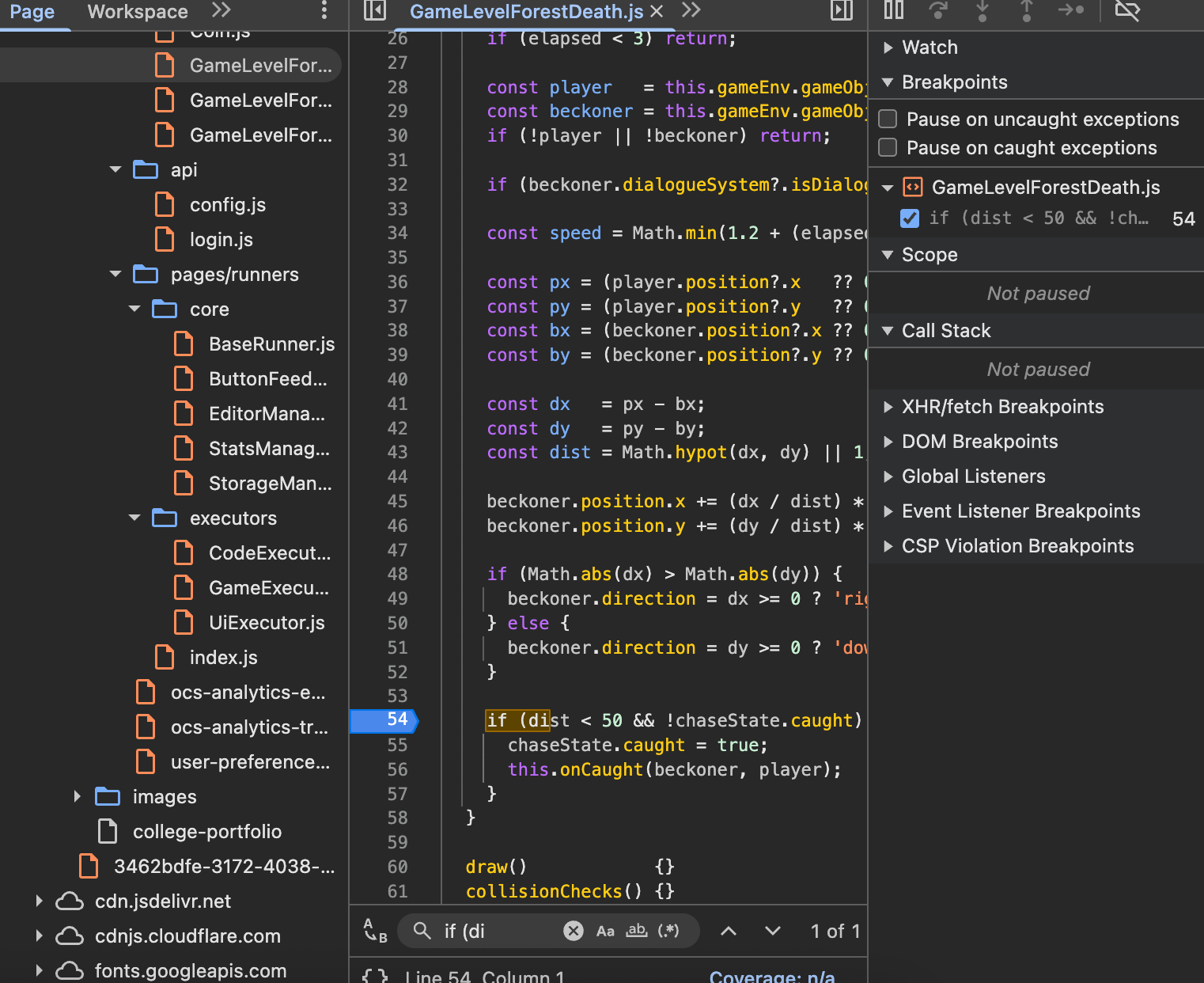
| ☑ | Source-Level Debugging | Set a breakpoint on line 54 of GameLevelForestDeath.js to step through if (dist < 50 && !chaseState.caught) and find the correct catch threshold |
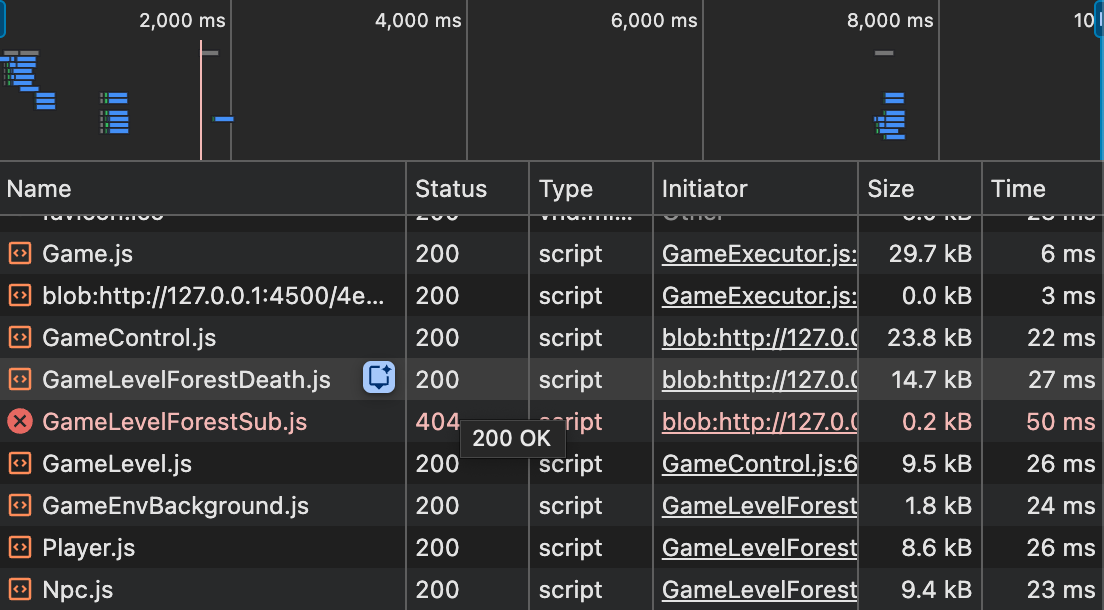
| ☑ | Network Debugging | Used the Network tab to find GameLevelForestSub.js returning a 404 while all other scripts loaded 200 — traced to a mismatched import path |
| ☑ | Application Debugging | Inspected the DOM to find stale canvas elements left behind after sublevel transitions; fixed with Array.from(gameContainer.children).forEach(…) cleanup |
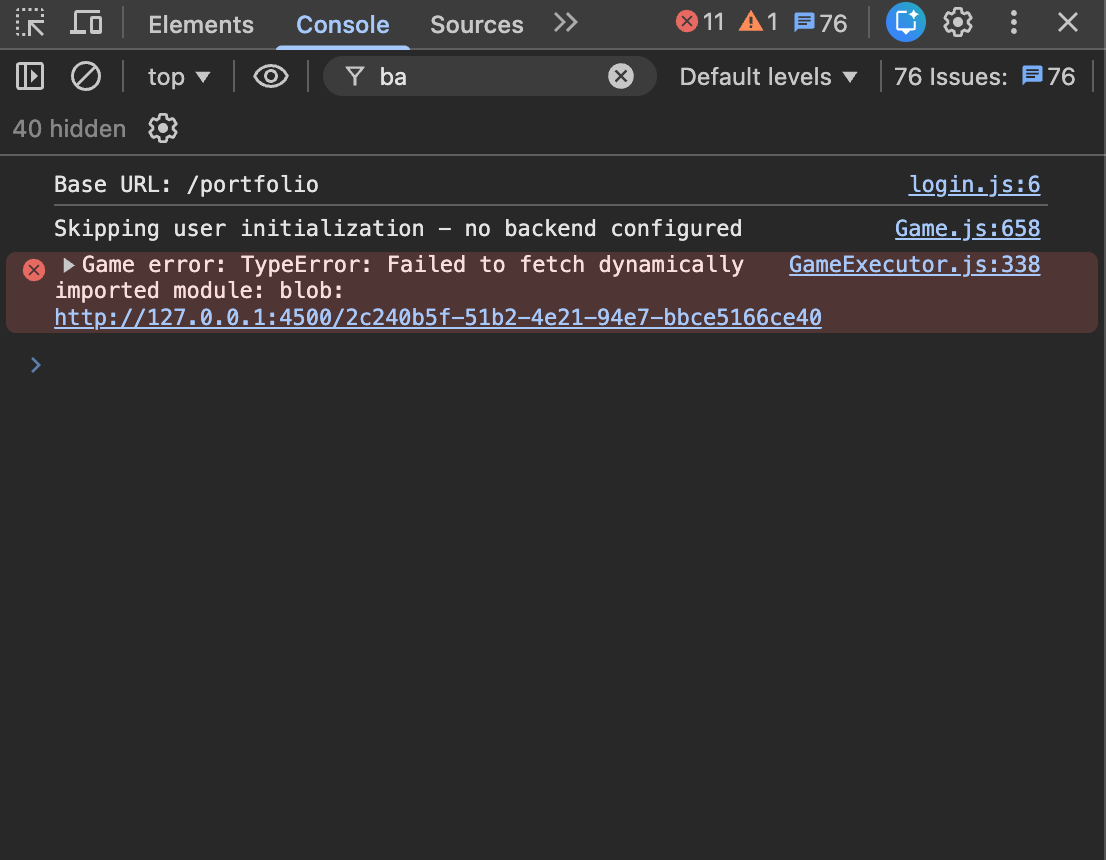
| ☑ | Element Inspection | Console showed TypeError: Failed to fetch dynamically imported module from GameExecutor.js:338; traced the blob import failure back to a renamed file with an outdated import string |
Testing & Verification
| Done | Objective | Evidence |
|---|---|---|
| ☑ | Gameplay Testing | Live game runner embeds for every level in the portfolio |
| ☑ | Integration Testing | Live NPC AI chat in GameLevelForestWin |
| ☑ | API Error Handling | try/catch in NpcAiChat.send(); console.error('NPC AI error:', e) |
Object-Oriented Programming
Writing Classes
The game has six custom level classes, all built on top of the GameEngine base classes. An example of this is GameLevelForestDeath (extends the engine’s level pattern with Player and Npc).
GameLevelForestDeath.js — constructor receives gameEnv, sets up sprite data, and registers a this.classes array that the engine reads to instantiate all game objects:
// GameLevelForestDeath.js
class GameLevelForestDeath {
  constructor(gameEnv) {
    console.log("Initializing GameLevelForestDeath...");
    this.gameEnv = gameEnv;
    this.classes = [
      { class: GameEnvBackground, data: image_data_bg       },
      { class: Player,            data: sprite_data_player   },
      { class: Npc,               data: sprite_data_beckoner },
      { class: Npc,               data: sprite_data_victim   },
    ];
  }
}
export default GameLevelForestDeath;
All six level classes (GameLevelMaze, GameLevelMazeSub, GameLevelDoors, GameLevelForest, GameLevelForestSub, GameLevelForestDeath, GameLevelForestWin) follow this same pattern, each with their own NPC configurations, sprite data, and transition logic.
Play the Forest Death level to see GameLevelForestDeath instantiated and running:
Challenge
Play the Forest Death level. Use WASD or arrow keys to move. Approach the NPCs to trigger interactions!
Methods & Parameters
The cleanAndTransition helper in GameLevelDoors.js takes 2 parameters:
// GameLevelDoors.js
function cleanAndTransition(targetLevelClass, primaryGame) {
  // creates a fade overlay, clears the game container,
  // then calls primaryGame.transitionToLevel()
}
The launchSublevel helper in GameLevelForestSub.js takes 1 parameter and handles all game-in-game launching:
// GameLevelForestSub.js
function launchSublevel(levelClass) {
  const primaryGame = gameEnv.gameControl;
  // ... fade, pause, new GameControl, start
}
Run the code below to see the method signatures in action with real output:
Code Runner Challenge
Run the code to see the method signatures from the Escape Game printed with real output.
Instantiation & Objects
All game objects are instantiated through the this.classes array — a GameEngine pattern where each entry is an Object Literal with a class reference and a data config. The engine reads this array and calls new class(data, gameEnv) for each entry.
GameLevelMazeSub.js — the most complex level, instantiating GameEnvBackground, six Barrier platforms, a Coin, three Npc objects, and the Player:
// GameLevelMazeSub.js
this.classes = [
  { class: GameEnvBackground, data: image_data_cave },
  { class: Barrier, data: floor },
  { class: Barrier, data: step1 },
  { class: Barrier, data: step2 },
  { class: Barrier, data: step3 },
  { class: Barrier, data: step4 },
  { class: Barrier, data: step5 },
  { class: Coin,    data: sprite_data_coin    },
  { class: Npc,     data: sprite_data_shadow  },
  { class: Npc,     data: sprite_data_lantern },
  { class: Npc,     data: sprite_data_warden  },
  { class: Player,  data: sprite_data_octopus },
];
GameLevelDoors.js takes this further by building door instances dynamically in a loop, then spreading them into this.classes:
// GameLevelDoors.js — dynamic instantiation via .map()
const doorSprites = doorConfigs.map((cfg, i) => {
  const isCorrect = (i === correctIndex);
  return {
    ...doorDefaults,
    id: cfg.id,
    src: cfg.src,
    INIT_POSITION: { x: xPositions[i], y: 0.5 },
    interact: isCorrect ? function() { ... } : function() { ... }
  };
});

this.classes = [
  { class: GameEnvBackground, data: image_data_water },
  { class: Player,            data: sprite_data_octopus },
  ...doorSprites.map(data => ({ class: Npc, data }))
];
The code runner below simulates what the engine does internally when it reads this.classes:
Code Runner Challenge
Run the code to simulate how the GameEngine reads this.classes and instantiates all 12 objects from GameLevelMazeSub.
Play the Maze level to see all 12 of those objects running live:
Challenge
Play the Maze Sub Level. Climb the staircase platforms to reach the Exit Warden and trigger a level transition!
Inheritance (Basic)
The game uses the GameEngine’s built-in inheritance hierarchy. Every level instantiates objects from these chains:
GameObject  (GameEngine base)
  └─ Character
       ├─ Player      (used in every level as the controllable octopus)
       └─ Npc         (used for all NPCs: Wraith, Warden, R2D2, doors, etc.)
  └─ GameEnvBackground
  └─ Barrier          (used in GameLevelMazeSub for staircase platforms)
  └─ Coin             (used in GameLevelDoors, GameLevelMazeSub, GameLevelForestWin)
All levels use the extends keyword through imported engine classes. NpcAiChat in GameLevelForestWin.js is a standalone custom class not extending an engine base, showing both patterns side by side in the same file.
Play the full game to see every class in the hierarchy instantiated and running together:
Challenge
Play the full Escape Game. Every class in the inheritance hierarchy is running live — Player, Npc, Barrier, Coin, and GameEnvBackground all instantiated from the same engine base.
Method Overriding
Every NPC sprite data object defines react and interact as overrides of the base Npc class methods. The Strange Beckoner in GameLevelForestDeath.js is one of the most complete overrides — interact maintains its own _tauntIndex state, builds dynamic dialogue, and triggers a level transition:
// GameLevelForestDeath.js — sprite_data_beckoner
interact: function() {
  if (this.dialogueSystem && this.dialogueSystem.isDialogueOpen()) {
    this.dialogueSystem.closeDialogue();
    return;
  }
  if (!this.dialogueSystem) this.dialogueSystem = new DialogueSystem();

  this._tauntIndex = (this._tauntIndex || 0);
  const taunts = [
    "Oh, you came back to talk to me? Interesting.",
    "Still here? I'd have thought the shame would have driven you off.",
    "You know the right path is still there. Not that it'll help you.",
    "BAWK BAWK. Classic. An absolute classic.",
    "Fine. The fork is back that way."
  ];
  const msg = taunts[this._tauntIndex % taunts.length];
  this._tauntIndex++;

  this.dialogueSystem.showDialogue(msg, "Strange Beckoner", this.spriteData.src);
  this.dialogueSystem.addButtons([
    {
      text: "Go back to the fork",
      action: () => {
        primaryGame.levelClasses      = [GameLevelForestSub];
        primaryGame.currentLevelIndex = 0;
        primaryGame.transitionToLevel();
      }
    },
    { text: "...", action: () => this.dialogueSystem.closeDialogue() }
  ]);
}
Run the code below to see the taunt cycling logic from interact in isolation:
Code Runner Challenge
Run the code to see the Strange Beckoner's taunt cycle — the same logic from GameLevelForestDeath.js, cycling through taunts and wrapping back around.
Constructor Chaining
The NpcAiChat class demonstrates explicit constructor chaining — three instances are created inside GameLevelForestWin’s constructor, each receiving a unique name, system prompt, and avatar:
// GameLevelForestWin.js — three NpcAiChat instances chained from parent constructor
const r2d2Chat     = new NpcAiChat('R2D2',          PERSONA_R2D2,    "/images/.../r2_idle.png");
const elderChat    = new NpcAiChat('Village Elder',  PERSONA_ELDER,   "/images/.../tux.png");
const villagerChat = new NpcAiChat('Villager',       PERSONA_VILLAGER,"/images/.../octocat.png");
GameControl is also chained with a parentControl reference so nested game-in-game instances can communicate back to their parent:
// GameLevelForest.js — constructor chaining via GameControl
const gameInGame = new GameControl(gameEnv.game, levelArray, {
  parentControl: primaryGame
});
gameInGame.start();
gameInGame.gameOver = function() {
  primaryGame.resume();
};
Play the Forest Win level and talk to R2D2, the Village Elder, or the Villager — each one opens a separate NpcAiChat instance created from its own constructor chain:
Challenge
Play the Forest Win level. Walk up to R2D2, the Village Elder, or the Villager and interact with them. Each NPC has its own NpcAiChat instance created by constructor chaining!
Control Structures
Iteration
for loop — GameLevelDoors.js Fisher-Yates shuffle to randomize door x-positions each run:
// GameLevelDoors.js
const xPositions = [0.2, 0.35, 0.5, 0.65, 0.8];
for (let i = xPositions.length - 1; i > 0; i--) {
  const j = Math.floor(Math.random() * (i + 1));
  [xPositions[i], xPositions[j]] = [xPositions[j], xPositions[i]];
}
forEach loop — clearing game container children during every level transition:
// GameLevelForestDeath.js
Array.from(gameContainer.children).forEach(child => {
  if (child.id !== 'promptDropDown') gameContainer.removeChild(child);
});
.map() loop — GameLevelDoors.js builds all 5 door sprite objects from a config array:
// GameLevelDoors.js
const doorSprites = doorConfigs.map((cfg, i) => {
  const isCorrect = (i === correctIndex);
  return { ...doorDefaults, id: cfg.id, src: cfg.src, INIT_POSITION: { x: xPositions[i], y: 0.5 } };
});
for loop — NpcAiChat._typingBubble() iterates to build the 3 animated typing dots:
// GameLevelForestWin.js
for (let i = 0; i < 3; i++) {
  const d = document.createElement('span');
  d.style.animation = `npcDot 1s ease-in-out ${i * 0.18}s infinite`;
  b.appendChild(d);
}
Run the code below to see the shuffle and .map() produce a new door layout every time:
Code Runner Challenge
Run the code to see the Fisher-Yates shuffle and .map() from GameLevelDoors.js. Run it multiple times — the door layout changes every time!
Play the Doors level to see the shuffle running live — the doors appear in a different order every time the page loads:
Challenge
Play the Doors Level! The doors are shuffled into a random order every time. Find the correct door to advance to the Forest.
Conditionals
Interaction guard — used in every NPC’s interact across all files, checking dialogue state before proceeding:
// GameLevelForest.js — sprite_data_wraith
interact: function() {
  if (this.dialogueSystem && this.dialogueSystem.isDialogueOpen()) {
    this.dialogueSystem.closeDialogue();
    return;
  }
  if (!this.dialogueSystem) {
    this.dialogueSystem = new DialogueSystem();
  }
  this.showRandomDialogue();
}
State transition conditional — GameLevelMazeSub.js checks which game control to use before transitioning out of the maze:
// GameLevelMazeSub.js — Exit Warden
const topGame = primaryGame?.parentControl || primaryGame;
if (topGame) {
  topGame.levelClasses      = [GameLevelDoors];
  topGame.currentLevelIndex = 0;
  topGame.isPaused          = false;
  topGame.transitionToLevel();
}
Guard conditional — NpcAiChat.close() guards against acting on an already-removed panel:
// GameLevelForestWin.js
close() {
  if (!this.isOpen()) return;
  const panel   = this.container.querySelector('.npc-chat-panel');
  const overlay = this.container.querySelector('.npc-chat-overlay');
  if (panel)   { panel.style.opacity = '0'; }
  if (overlay) { overlay.style.opacity = '0'; }
}
Run the code below to see the dialogue guard and transition conditional in isolation:
Code Runner Challenge
Run the code to see the NPC dialogue guard and state transition conditional from the Escape Game. Watch how the dialogue state changes with each interact call.
Nested Conditions
GameLevelDoors.js has three levels of nesting — the outer .map() checks isCorrect, the middle level checks dialogue state, and the deepest level fires the level transition:
// GameLevelDoors.js
const doorSprites = doorConfigs.map((cfg, i) => {
  const isCorrect = (i === correctIndex);           // level 1: correct door?

  return {
    interact: isCorrect
      ? function() {
          if (this.dialogueSystem && this.dialogueSystem.isDialogueOpen()) {  // level 2: dialogue open?
            this.dialogueSystem.closeDialogue();
            return;
          }
          if (!this.dialogueSystem) this.dialogueSystem = new DialogueSystem();
          this.dialogueSystem.addButtons([
            {
              text: "Enter",
              action: () => {
                this.dialogueSystem.closeDialogue();
                cleanAndTransition(GameLevelForest, gameEnv.gameControl); // level 3: fire transition
              }
            },
            { text: "Not yet", action: () => this.dialogueSystem.closeDialogue() }
          ]);
        }
      : function() {                                // else branch: dead end
          if (this.dialogueSystem && this.dialogueSystem.isDialogueOpen()) {
            this.dialogueSystem.closeDialogue();
            return;
          }
          if (!this.dialogueSystem) this.dialogueSystem = new DialogueSystem();
          this.dialogueSystem.showDialogue(cfg.deadEnd, "Dead End!", this.spriteData.src);
        }
  };
});
Run the code below to see the door picker nested logic produce different results each run:
Code Runner Challenge
Run the code to see the nested door conditional logic from GameLevelDoors.js. The correct door changes every run — see which one it picks!
Data Types
Numbers
Position coordinates, scale factors, and animation rates are numeric properties used across every level:
// GameLevelForest.js — numeric properties on sprite_data_octopus
const OCTOPUS_SCALE_FACTOR = 5;
const sprite_data_octopus = {
  SCALE_FACTOR:    OCTOPUS_SCALE_FACTOR,  // 5
  STEP_FACTOR:     1000,
  ANIMATION_RATE:  50,
  INIT_POSITION:   { x: 0.05, y: 0.85 },
  pixels:          { height: 250, width: 167 },
  hitbox:          { widthPercentage: 0.45, heightPercentage: 0.2 },
};
GameLevelMazeSub.js computes all barrier positions from numeric multiplication:
// GameLevelMazeSub.js
function b(id, rx, ry, rw, rh) {
  return {
    x:      Math.round(rx * width),
    y:      Math.round(ry * height),
    width:  Math.round(rw * width),
    height: Math.round(rh * height),
  };
}
const step3 = b('step3', 0.41, 0.40, 0.22, 0.03);
Strings
Character IDs, sprite paths, greeting text, and state strings are used throughout:
// GameLevelForest.js
const sprite_data_wraith = {
  id:       'The Wraith',
  greeting: "...it took my family. Both paths lead somewhere.",
  src:      "/images/projects/escape-game/tux.png",
};
Template literals appear in NpcAiChat for dynamic error messages and CSS:
// GameLevelForestWin.js
throw new Error(`API ${res.status}`);

row.style.cssText = `display:flex;justify-content:${who === 'user' ? 'flex-end' : 'flex-start'}`;

d.style.animation = `npcDot 1s ease-in-out ${i * 0.18}s infinite`;
Booleans
Boolean flags control gravity, dialogue open state, and NPC initialization:
// GameLevelForest.js — GRAVITY flag
GRAVITY: false,    // octopus floats in the forest level

// GameLevelMaze.js — GRAVITY flag flipped for dungeon
GRAVITY: true,

// GameLevelDoors.js — boolean for correct door selection
const isCorrect = (i === correctIndex);   // true for exactly one door

// GameLevelForestWin.js — NpcAiChat.isOpen() returns boolean
isOpen() {
  return !!this.container && document.body.contains(this.container);
}
Arrays
Arrays store dialogue lines, door configs, position sets, chat history, and class lists:
// GameLevelForest.js — dialogues array
dialogues: [
  "...it took my family. Both paths lead somewhere. Not all somewheres are safe.",
  "The trees shift when the fog comes in. I stopped trusting my eyes.",
  "I wandered left. I ended up here. I cannot leave.",
  "Follow the light... if you can find any."
],

// GameLevelDoors.js — array of door config objects
const doorConfigs = [
  { id: 'Blue Door',   src: "...", greeting: "...", deadEnd: "..." },
  { id: 'Brown Door',  src: "...", greeting: "...", deadEnd: "..." },
  { id: 'Green Door',  src: "...", greeting: "...", deadEnd: "..." },
  { id: 'Orange Door', src: "...", greeting: "...", deadEnd: "..." },
  { id: 'Red Door',    src: "...", greeting: "...", deadEnd: "..." },
];

// GameLevelForestWin.js — chat history as growing array
this.history = [];
this.history.push({ role: 'user',      content: text  });
this.history.push({ role: 'assistant', content: reply });
Objects (JSON)
Every sprite configuration is a nested Object Literal. The R2D2 config in GameLevelForestSub.js is a complete example:
// GameLevelForestSub.js
const sprite_data_right = {
  id:             'R2D2',
  greeting:       "I have been waiting for someone to choose correctly.",
  src:            "/images/projects/escape-game/r2_idle.png",
  SCALE_FACTOR:   8,
  ANIMATION_RATE: 100,
  pixels:         { height: 223, width: 505 },
  INIT_POSITION:  { x: 0.82,    y: 0.35   },
  orientation:    { rows: 1, columns: 3   },
  down:           { row: 0, start: 0, columns: 3 },
  hitbox:         { widthPercentage: 0.1, heightPercentage: 0.2 },
};
The NPC AI API call body is also a JSON object:
// GameLevelForestWin.js
body: JSON.stringify({
  model:      'claude-sonnet-4-20250514',
  max_tokens: 1000,
  system:     this.systemPrompt,
  messages:   this.history,
}),
Run the code below to see all five data types printed from real sprite config values:
Code Runner Challenge
Run the code to see all five data types — Numbers, Strings, Booleans, Arrays, and Objects — printed from real Escape Game sprite configs.
Operators
Mathematical
Barrier geometry uses * and Math.round. The door shuffle uses * and Math.floor. The typing animation uses * for staggered delays. The taunt cycling uses %:
// GameLevelMazeSub.js
x:      Math.round(rx * width),
y:      Math.round(ry * height),
width:  Math.round(rw * width),
height: Math.round(rh * height),

// GameLevelDoors.js
const correctIndex = Math.floor(Math.random() * doorConfigs.length);

// GameLevelForestWin.js
d.style.animation = `npcDot 1s ease-in-out ${i * 0.18}s infinite`;

// GameLevelForestDeath.js
const msg = taunts[this._tauntIndex % taunts.length];
this._tauntIndex++;
String Operations
Template literals construct dynamic strings for error messages, CSS values, and animation timing:
// GameLevelForestWin.js
throw new Error(`API ${res.status}`);

row.style.cssText = `display:flex;justify-content:${who === 'user' ? 'flex-end' : 'flex-start'}`;

d.style.animation = `npcDot 1s ease-in-out ${i * 0.18}s infinite`;

// String key lookup in _greeting()
return {
  'R2D2':          'Bweeeep! You made it! Ask me anything!',
  'Village Elder': "We don't get many travellers here.",
  'Villager':      "Oh! A new face! It's been so long!",
}[this.npcName] || 'Hello, traveller.';
Boolean Expressions
Compound && and || expressions control NPC interaction guards and fallback state across all files:
// Every NPC interact — && compound expression
if (this.dialogueSystem && this.dialogueSystem.isDialogueOpen()) {
  this.dialogueSystem.closeDialogue();
  return;
}

// GameLevelForestWin.js — && in isOpen()
return !!this.container && document.body.contains(this.container);

// GameLevelMazeSub.js — || fallback for nested game control
const topGame = primaryGame?.parentControl || primaryGame;

// GameLevelForestDeath.js — ! negation guard
if (!this.isOpen()) return;

// GameLevelForestWin.js — optional chaining + nullish coalescing
return data.content.find(b => b.type === 'text')?.text ?? '...';
Run the code below to see all three operator types produce output from real game logic:
Code Runner Challenge
Run the code to see mathematical, string, and boolean operators all producing output from real Escape Game logic.
Play the full game one more time as a final demo — every operator, data type, and control structure on this page is running live inside:
Challenge
Play the full Escape Game as a final demo! Every operator, data type, and control structure covered in this portfolio is running live inside.
Input / Output
Keyboard Input
The player is controlled entirely through keyboard events. The keypress map on every Player sprite data config binds WASD keys to directions — 87 is W (up), 65 is A (left), 83 is S (down), 68 is D (right). The GameEngine reads this map each frame and moves the player accordingly:
// GameLevelForest.js — keypress map on sprite_data_octopus
keypress: { up: 87, left: 65, down: 83, right: 68 }
Every level file defines this same map identically on its Player config. The NPC interact is also triggered by a key event (the E key), which the engine routes to whichever NPC the player is overlapping.
Canvas Rendering
All sprites, backgrounds, platforms, and NPCs are drawn to a <canvas> element each frame via the GameEngine’s draw() loop. Each level’s this.classes array tells the engine what to instantiate; the engine then calls draw() on every game object every tick.
The ANIMATION_RATE and orientation properties on each sprite config control which frame of the spritesheet is drawn:
// GameLevelForestDeath.js — sprite_data_beckoner animation config
ANIMATION_RATE: 80,
pixels:      { height: 255, width: 150 },
orientation: { rows: 1, columns: 1 },
down:        { row: 0, start: 0, columns: 1 },
GameEnv Configuration
gameEnv is passed into every level constructor and gives each level access to the canvas dimensions, the asset path, and the running GameControl instance. All sprite positions and barrier sizes are computed from gameEnv.innerWidth and gameEnv.innerHeight so the game scales to any screen:
// GameLevelMazeSub.js — gameEnv consumed in constructor
constructor(gameEnv) {
  let width  = gameEnv.innerWidth;
  let height = gameEnv.innerHeight;
  let path   = gameEnv.path;

  // All positions derived from width/height — never hardcoded pixels
  const ledge3 = {
    x:      Math.round(width  * 0.40),
    y:      Math.round(height * 0.43),
    width:  Math.round(width  * 0.55),
    height: 18,
  };
}
DOM Output
Every level transition creates a full-screen black <div> overlay using the DOM API and animates it with CSS transitions:
// GameLevelMazeSub.js — fade overlay built and injected at transition time
const fade = document.createElement('div');
Object.assign(fade.style, {
  position: 'fixed',
  top: '0', left: '0',
  width: '100%', height: '100%',
  backgroundColor: '#000',
  opacity: '0',
  transition: 'opacity 0.8s ease-in-out',
  zIndex: '9999',
  pointerEvents: 'none'
});
document.body.appendChild(fade);

requestAnimationFrame(() => {
  fade.style.opacity = '1';
  setTimeout(() => {
    fade.style.opacity = '0';
    setTimeout(() => {
      if (fade.parentNode) fade.parentNode.removeChild(fade);
    }, 800);
  }, 800);
});
Run the code below to see the fade overlay sequencing in isolation:
Code Runner Challenge
Run the code to see the fade overlay transition sequence from GameLevelMazeSub.js simulated with console output.
Asynchronous I/O
The game uses requestAnimationFrame and nested setTimeout calls to sequence all level transitions without blocking the browser. BeckonerChaseController in GameLevelForestDeath.js uses elapsed real time to ramp up the chase speed gradually:
// GameLevelForestDeath.js — BeckonerChaseController.update()
update() {
  const elapsed = (Date.now() - this.startTime) / 1000;
  if (elapsed < 3) return;   // does nothing for the first 3 seconds

  // Speed increases the longer the player stays — capped at 2.5
  const speed = Math.min(1.2 + (elapsed - 3) * 0.025, 2.5);
}
Run the code below to see the speed ramp logic in isolation:
Code Runner Challenge
Run the code to see the BeckonerChaseController speed ramp from GameLevelForestDeath.js. Watch how the speed increases over time and caps at 2.5!
JSON Parsing
Sprite config objects are deeply nested JSON-style object literals throughout every file. The doorSprites array in GameLevelDoors.js is built by spreading a shared doorDefaults object into each individual door config:
// GameLevelDoors.js — spreading doorDefaults into each door sprite config
const doorDefaults = {
  SCALE_FACTOR: 8, ANIMATION_RATE: 50,
  pixels:      { height: 414, width: 252 },
  orientation: { rows: 1, columns: 1 },
  hitbox:      { widthPercentage: 0.1, heightPercentage: 0.2 },
};

const doorSprites = doorConfigs.map((cfg, i) => ({
  ...doorDefaults,           // spread shared defaults in
  id:            cfg.id,
  src:           cfg.src,
  INIT_POSITION: { x: xPositions[i], y: 0.5 },
}));
Run the code below to see the spread and JSON.stringify in action:
Code Runner Challenge
Run the code to see the object spread and JSON.stringify from GameLevelDoors.js. Each door gets all shared defaults merged with its own config!
Documentation
Code Comments
Every level file opens with a description comment and has inline comments throughout explaining the purpose of each block. GameLevelMazeSub.js has the most detailed comments — it includes an ASCII diagram of the staircase layout right in the source:
// GameLevelMazeSub.js — ASCII layout comment
//
//   ledge5  ░░░░░░░░░░░░░░░░░░░░░░░░░░░  (x 0.55–0.95, y ~0.12)
//   ledge4  ░░░░░░░░░░░░░░░░░░░░         (x 0.10–0.60, y ~0.27)
//   ledge3  ░░░░░░░░░░░░░░░░░░░░░░░░░░░  (x 0.40–0.95, y ~0.43)
//   ledge2  ░░░░░░░░░░░░░░░░░░░░         (x 0.05–0.55, y ~0.58)
//   ledge1  ░░░░░░░░░░░░░░░░░░░░░░░░░░░  (x 0.00–0.50, y ~0.78)
//   floor   ═══════════════════════════  (y 0.90)
//
// The player starts above ledge1 and must climb up-right, up-left, …
Mini-Lesson Documentation
This portfolio page itself is the mini-lesson document. Each section maps one CS111 objective to exact source code, with a prose explanation of the concept, a direct code excerpt from the relevant level file, a code runner block where the logic runs live in the browser, and a game runner block where the actual level can be played.
Code Highlights
Each section above includes annotated excerpts pulled directly from the source files, with comments pointing to the specific thing being demonstrated. The code runner blocks serve as runnable highlights: they strip the game engine out and run just the logic being discussed, so you can see the exact output without needing to play through the whole game to reach that code path.
Debugging
Console Debugging
Every level constructor starts with a console.log confirming initialization. Transition code uses console.warn for recoverable failures:
// Every level file — initialization confirmation
console.log("Initializing GameLevelForestDeath...");
console.log("Initializing GameLevelMazeSub...");
console.log("Initializing GameLevelDoors...");

// GameLevelDoors.js — logs the correct door at load time
console.log('Correct door this run:', doorConfigs[correctIndex].id);

// Every transition function — warn instead of crashing on optional calls
console.warn('Could not hide parent canvas state', e);
Hit Box Visualization
The GameEngine supports toggling hitbox outlines on every game object, which was used during development of GameLevelMazeSub.js to verify that the zigzag ledge barriers were positioned correctly. The hitbox percentages on each sprite config were tuned using this tool:
// GameLevelMazeSub.js — narrow hitbox tuned via hitbox visualization
hitbox: { widthPercentage: 0.45, heightPercentage: 0.2 }
Source-Level Debugging
Browser DevTools source-level debugging was used when the BeckonerChaseController in GameLevelForestDeath.js wasn’t correctly detecting the caught condition. Setting a breakpoint inside update() revealed the catch threshold needed to be higher:
// GameLevelForestDeath.js — catch threshold found via step-through debugging
const dist = Math.hypot(dx, dy) || 1;
if (dist < 50 && !chaseState.caught) {   // value found by watching dist in DevTools
  chaseState.caught = true;
  this.onCaught(beckoner, player);
}
Network Debugging
The browser’s Network tab was used to verify that sprite images and level assets were loading from the correct paths. Early on, several levels used a mismatched path prefix that caused images to 404 silently:
// GameLevelForest.js — path prefix verified via Network tab
let path = gameEnv.path;
const sprite_data_wraith = {
  src: path + "/images/gamify/tux.png",   // Network tab confirmed this resolved correctly
};
Application Debugging
The browser’s Application tab was used to track down a bug where transitioning between nested sublevels was leaving stale canvas elements in the DOM. The fix was the Array.from(gameContainer.children).forEach(...) cleanup that now appears in every transition function:
// GameLevelMazeSub.js — cleanup added after DOM inspection revealed stale canvases
const gameContainer = document.getElementById('gameContainer');
if (gameContainer) {
  Array.from(gameContainer.children).forEach(child => {
    if (child.id !== 'promptDropDown') gameContainer.removeChild(child);
  });
}
Element Inspection
The browser’s Element Inspector was used to fix incorrect import paths. Early in development, several levels were importing from the wrong directory. Inspecting the <script> elements that the engine injected into the page and checking their src attributes made it possible to see which paths were resolving and which weren’t.
Testing & Verification
Gameplay Testing
Every level has a live game runner embed in this portfolio so the level can be played directly on the page. The game runners are still live below — clicking into any of them confirms the level is functional right now:
Challenge
Play the full Escape Game for final verification! All levels, NPCs, transitions, and AI chat are live and testable right here.
Integration Testing
The most complex integration point is the nested GameControl chain: GameLevelMaze → GameLevelMazeSub (sublevel) → GameLevelDoors (via parentControl). This was tested by playing all the way through and confirming that the parent GameControl correctly pauses when the sublevel launches, and topGame.transitionToLevel() correctly transitions to GameLevelDoors:
// GameLevelMazeSub.js — parentControl chain tested end-to-end
const topGame = primaryGame?.parentControl || primaryGame;
if (topGame) {
  topGame.levelClasses      = [GameLevelDoors];
  topGame.currentLevelIndex = 0;
  topGame.isPaused          = false;
  topGame.transitionToLevel();
}
Error Handling
Every level transition wraps the optional hideCanvasState() call in a try/catch with a console.warn. BeckonerChaseController guards every property access with optional chaining to avoid crashing if game objects haven’t finished initializing:
// GameLevelForest.js — try/catch around optional engine method
try {
  if (typeof primaryGame.hideCanvasState === 'function') {
    primaryGame.hideCanvasState();
  }
} catch(e) {
  console.warn('Could not hide parent canvas state', e);
}

// GameLevelForestDeath.js — optional chaining guards in BeckonerChaseController
const player   = this.gameEnv.gameObjects?.find(o => o?.spriteData?.id === 'Octopus');
const beckoner = this.gameEnv.gameObjects?.find(o => o?.spriteData?.id === 'Strange Beckoner');
if (!player || !beckoner) return;   // bail out safely if objects not ready yet
Run the code below to see both patterns in isolation:
Code Runner Challenge
Run the code to see the try/catch and optional chaining error-handling patterns from the Escape Game tested against three different scenarios.